 Khoj
Find any listing from your WhatsApp groups in seconds
Khoj reads the property groups you're already in and turns every listing into one searchable dashboard. Type “2 BHK Andheri West under 85k” and see every match, with the broker one tap away.
- Reads only the groups you pick
- Never sends a message
- Demo runs on your own groups
- Rent
2 BHK in Andheri West
₹82,000/mo
Semi furnished · 850 sqft
Andheri-Bandra Brokers Network · Rohan Mehta Realty · 39 min ago
- Rent
2 BHK in Andheri West
₹78,000/mo
Fully furnished · 780 sqft
Mumbai Rentals Exchange · Priya Estates · 1 hr ago
- Rent
2 BHK in Andheri West
₹75,000/mo
Unfurnished · 720 sqft
Andheri-Bandra Brokers Network · Kunal Dsouza · 2 hr ago
Example search · sample listings
You saw the right flat. You just can't find it again.
A client asks for a 2 BHK in Andheri West under 85k. You know a listing like that came in this week. It's somewhere in one of your groups.
- 01
Fifty groups, thousands of messages
Listings arrive all day across every group you're in. By evening, this morning's best flat is buried under a few hundred new ones.
- 02
WhatsApp search wasn't built for this
It only matches exact words. “2bhk”, “2 BHK” and “two bed” are three different searches, and none of them understands “under 85k”.
- 03
The same flat, posted again and again
One listing gets forwarded across groups, so you scroll past the same message five times while the new ones slip by.
While you scroll, another broker sends your client the flat first.
Every listing, filed and searchable
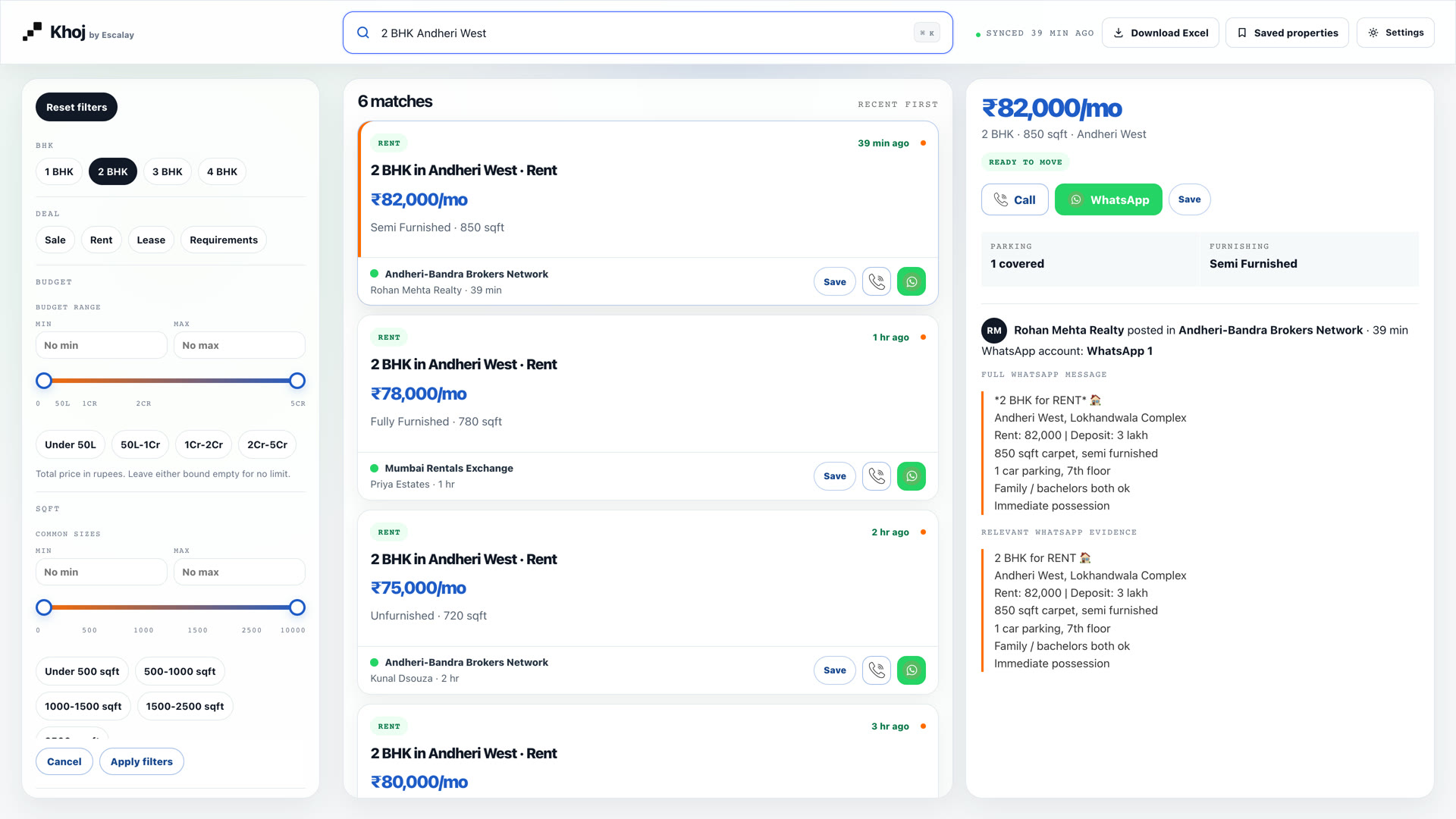
This is Khoj with sample listings: one search across every group, filters down the side, and the full WhatsApp message beside each result.
Set up in a few minutes, then just search
-
01
Scan a QR code
Link Khoj to your WhatsApp the same way you link WhatsApp Web. Same number, nothing to install.
-
02
Pick your property groups
Tick the groups you want searched. Personal chats and every other group stay untouched.
-
03
Search in plain English
From then on, every new listing is read and filed. Type what the client wants and the matches are there.
What arrives in the group
What Khoj files
- Deal
- Rent
- Size
- 2 BHK · 850 sqft
- Locality
- Andheri West
- Rent
- ₹82,000 / month
- Furnishing
- Semi furnished
- Parking
- 1 covered
Answer a client while they're still on the call
Search the way you talk
“2bhk andheri w rent 85k” works. So do lakh and crore.
Filter in one tap
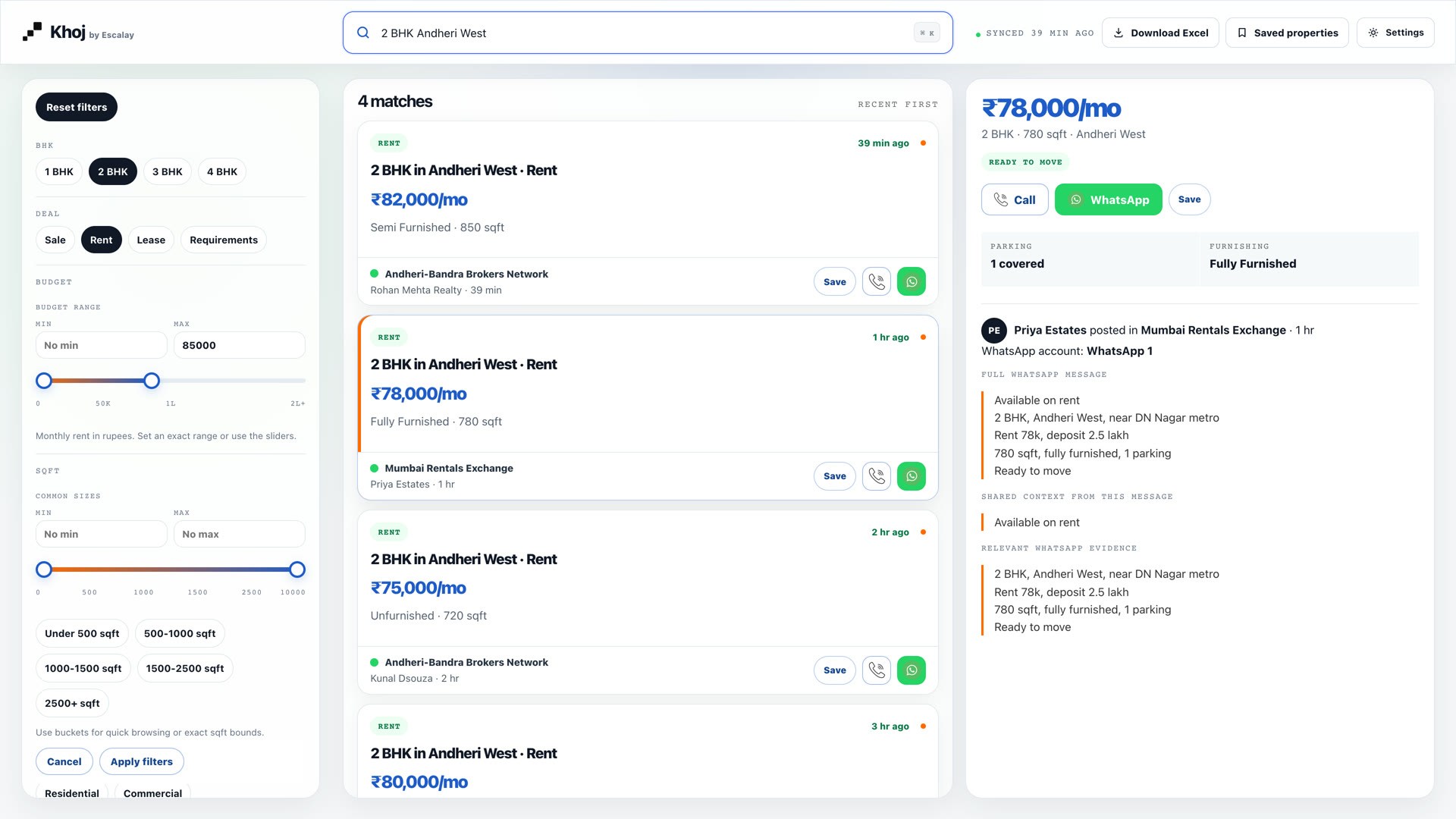
BHK, sale or rent, budget and size, without scrolling a single group.
See the original message
Who posted it, in which group and when, with the full WhatsApp text.
Call or WhatsApp the broker
One tap to check it's still available before you send it to your client.
Save and export
Shortlist listings for a client, or download the whole list to Excel.
Khoj reads. It never speaks for you.
Your groups and contacts are your business. Khoj is built to stay out of everything except the listings you ask it to file.
Only the groups you pick
Khoj reads the property groups you tick, and nothing else.
Personal chats untouched
Your one-to-one chats and family groups are never read.
Never sends a message
Khoj only reads. It never posts in a group or messages anyone.
Private to your team
Listings sit behind your login. No one outside your team sees them.
See Khoj on your own WhatsApp groups
Pick a time that suits you. On the call we show you Khoj on real listings and run the searches you'd normally scroll for.
- 01How you find listings for clients today
- 02Khoj searching your kind of listings, live
- 03Your questions, and what setup looks like for your team

Yuvraj Singh ThakurFounder, Escalay. You'll speak with me directly.
Loading the calendar…
Open the booking page insteadBefore you book
Do I need a new number or an app?
No. You link your existing WhatsApp by scanning a QR code, the same way you use WhatsApp Web, and open Khoj in your browser.
Can Khoj read my personal chats?
No. It reads only the groups you tick. Your one-to-one chats and every group you leave unticked are not read.
Will it send messages from my number?
No. Khoj only reads listings. It never posts in a group or messages anyone on your behalf.
What kind of messages does it understand?
The way brokers actually write: “2bhk andheri w rent 85k nego”, prices in lakh and crore, sale, rent and lease listings, and client requirements, each kept with the original message so you can check the details.
What about the same flat posted in five groups?
Khoj recognises repeated copies of the same message, so you aren't wading through the same listing again and again.
Who can see the listings?
Only people with a login to your Khoj dashboard. No one outside your team sees your groups or your listings.
What happens after the demo?
If Khoj fits how you work, we set it up on your groups and walk your team through it. If it doesn't, no hard feelings.